

Executive Summary
In the contemporary digital landscape, the agility and scalability of an organization’s technical infrastructure are not merely operational details but primary determinants of market competitiveness. This correlation is particularly pronounced in two-sided marketplaces within the high-touch Health and Wellness sector. Here, the friction between service providers seeking robust scheduling tools and clients demanding immediate, seamless booking experiences can determine the platform’s viability. This white paper presents an exhaustive analysis of a high-stakes architectural remediation engagement undertaken by Acme Software. The objective was to transform a legacy, monolithic React-based web application into a scalable, mobile-first ecosystem utilizing Flutter and Clean Architecture.
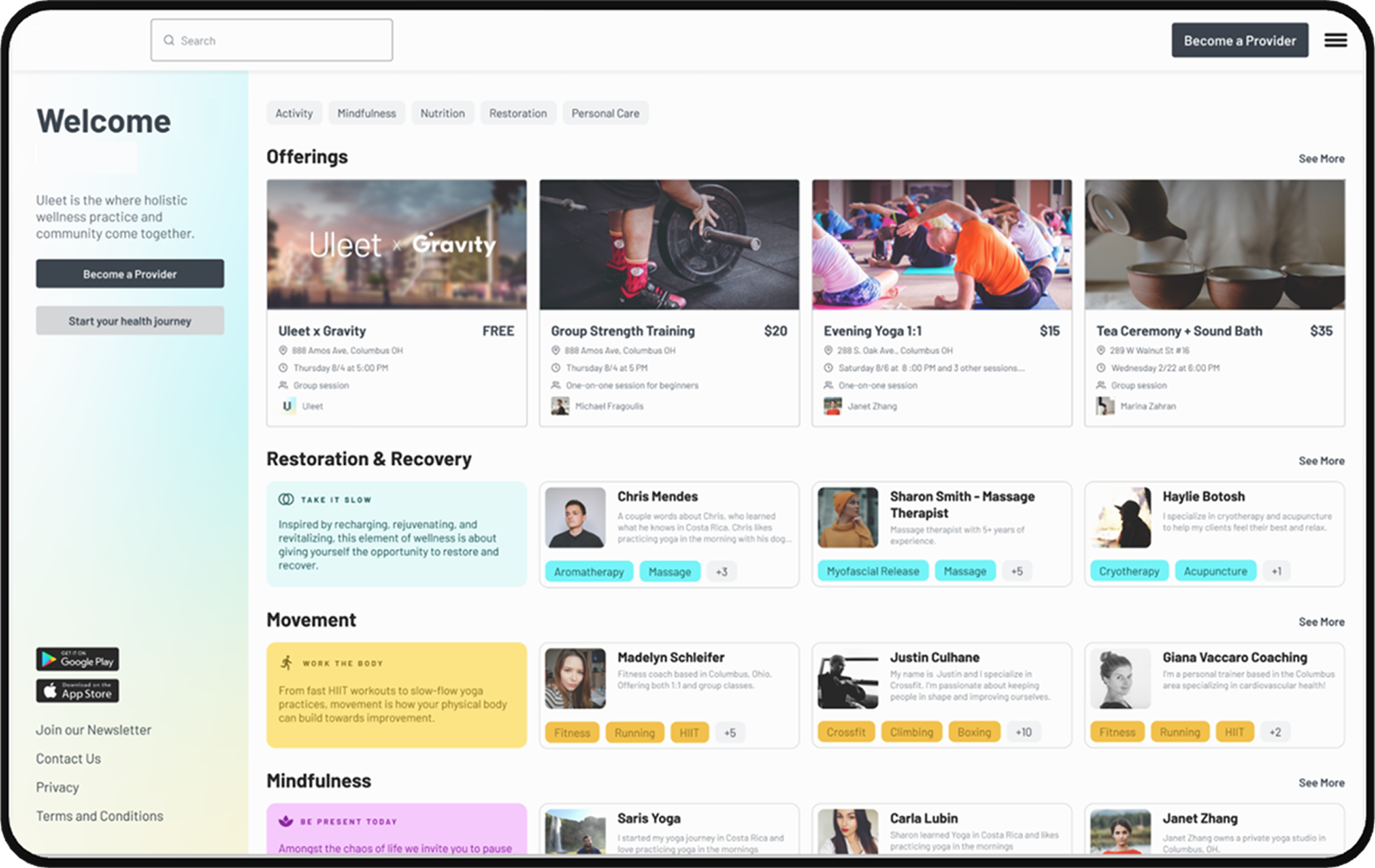
The subject platform, referred to herein as “The Wellness Marketplace,” faced an existential crisis typical of rapid-growth startups. Built initially for speed using a “Direct-to-Database” pattern with React and Firebase, the platform hit a ceiling of technical debt. As user concurrency grew, the tight coupling between the user interface and the Firestore database resulted in “read amplification”-a phenomenon where inefficient rendering logic triggered exponential database read operations, inflating operational costs and degrading performance. Furthermore, the legacy web-only architecture failed to address the increasing demand for a native mobile experience, leaving a significant gap in the platform’s value proposition for on-the-go wellness providers.
This report details the strategic pivot to Google’s Flutter framework, chosen not just for its cross-platform capabilities but for its enforcement of strict architectural discipline when paired with the clean_framework package. We dissect the implementation of the “Strangler Fig” migration pattern, enabling the incremental replacement of legacy React components with modern Flutter modules served via an Nginx reverse proxy. We also explore the integration of enterprise-grade features, including Algolia for high-performance discovery and Stripe for secure financial orchestration, all encapsulated within rigorous architectural boundaries. The outcomes underscore a definitive shift: by embracing a layered architecture and automated CI/CD pipelines, the enterprise achieved a reduction in database egress costs, enhanced security posture, and a unified codebase capable of simultaneous deployment to iOS, Android, and Web.
1. Initial Challenges and Risk Assessment
The engagement commenced with a forensic audit of the existing “Wellness Marketplace” platform. The legacy system, a responsive web application built on React, relied exclusively on Firebase for its backend-as-a-service (BaaS) needs, including Firestore for data persistence and Cloud Functions for sporadic server-side logic. While this stack is instrumental for zero-to-one product development, the absence of a formal architectural pattern created significant structural vulnerabilities as the platform scaled.
1.1 The “Direct-to-Database” Anti-Pattern and Read Amplification
The most critical finding during the code audit was the prevalence of the “Direct-to-Database” anti-pattern. In an effort to minimize development time, the original engineering team coupled React UI components directly with Firebase SDKs. Business logic-such as determining whether a provider was available for a specific time slot-was embedded within the UI rendering lifecycle.
This coupling had severe financial and performance implications due to the mechanics of the Firestore pricing model. Firestore charges based on the number of document reads, writes, and deletes. In the legacy React application, a component re-render (triggered by unrelated state changes) often re-executed the database query logic. For a marketplace with high-frequency read operations-such as clients browsing hundreds of potential wellness sessions-this inefficiency led to “Read Amplification.” A single user session could trigger thousands of redundant reads, driving cloud costs up disproportionately to revenue growth.
The following table illustrates the disparity between the legacy implementation and optimized architectural standards regarding database interactions:
| Metric | Legacy React Implementation (Direct-to-DB) | Optimized Standard (Goal) | Impact of Deviation |
|---|---|---|---|
| Query Origin | Embedded in UI Components | Abstrated via Gateways | Logic duplication & testing difficulty |
| Re-fetch Triggers | Component Re-renders | Explicit User Actions / Stale Cache | Exponential read cost inflation |
| Data Transformation | Client-side (UI Thread) | Isolated Domain Layer | UI jank & blocked main thread |
| Security Validation | Firestore Security Rules (Complex) | Validated via Business Logic | High risk of rule breakage/leaks |
| Caching Strategy | Browser/SDK Default | Logic-aware In-memory Cache | Inefficient network usage |
1.2 The Native Mobile Gap and Platform Lock-in
The initial platform was strictly web-based. While responsive web design allows for accessibility on mobile devices, it fails to deliver the tactile responsiveness, hardware integration (e.g., calendar syncing, biometrics), and push notification capabilities expected by modern users. Wellness providers, who often manage their schedules between sessions, required a robust mobile experience that the React web app could not provide.
The engineering leadership faced a dilemma: fork the codebase to build a separate React Native application or rewrite the frontend. Maintaining two separate codebases (React for Web, React Native for Mobile) would effectively double the maintenance burden and bifurcate the engineering team’s focus. Furthermore, the existing logic was heavily dependent on the specific implementation details of the Firebase Web SDK, creating a form of vendor lock-in that made migrating to alternative backends or adding complex native features prohibitively expensive.
1.3 Architectural Assessment Summary
The assessment concluded that the “Wellness Marketplace” was suffering from a classic case of technical debt accumulation where the initial architectural choices, optimized for speed, were now actively impeding growth. The platform required a fundamental re-architecture-a “remediation” rather than a simple update. The decision was made to transition to Flutter. This choice was driven by the need for a “write once, deploy everywhere” solution that offered native performance on mobile and a viable web target. More importantly, the transition provided the opportunity to enforce Clean Architecture principles from the ground up, ensuring that future scalability would not be compromised by the coupling issues that plagued the legacy system.
2. Architectural Strategy: The Move to Clean Architecture
The remediation strategy centered on the rigorous implementation of Clean Architecture. This software design philosophy, popularized by Robert C. Martin (Uncle Bob), emphasizes the separation of concerns and the “Dependency Rule,” which states that source code dependencies can only point inwards. Nothing in an inner circle (Business Logic) can know anything at all about something in an outer circle (UI, Database, Frameworks).
2.1 The Role of clean_framework in Standardization
To ensure consistent application of these principles across a distributed engineering team, Acme Software selected the clean_framework package. This package provides a pragmatic, Flutter-centric implementation of Clean Architecture, offering concrete base classes that enforce the necessary boundaries between layers.
The architecture implemented for the Wellness Marketplace is strictly divided into concentric layers, each with a distinct responsibility:
- Presentation Layer (The Outer Ring): This layer contains the Flutter Widgets and the Presenters. In clean_framework, the Presenter acts as a binding layer. It subscribes to a specific slice of the application state (ViewModel) and exposes it to the UI. Crucially, the UI widgets are “dumb”; they simply render the data provided by the Presenter and dispatch user events back to it. They contain no business logic.
- Domain Layer (The Core): This is the heart of the application, containing Entities and Use Cases.
- Entities: Immutable data structures that represent the state of the application. They are pure Dart objects with no dependencies on Flutter or Firebase.
- Use Cases: These classes contain the application-specific business rules. They receive inputs from the Presentation layer, process them (e.g., calculating the total price of a booking), update the Entities, and orchestrate data fetching via Gateways.
- External Interface Layer (The Adapters): This layer acts as the bridge between the pure Domain and the dirty external world.
- Gateways: Abstract interfaces defined by the Domain layer. The Use Case asks the Gateway for data, unaware of where it comes from.
- External Interfaces: The concrete implementations that interact with third-party libraries. For this project, specific interfaces were built for firebase_core, dio (for HTTP calls), and stripe_sdk.
2.2 Decoupling via Dependency Inversion
The most significant shift from the legacy React app was the inversion of control. In the legacy app, a “Booking Component” would likely import the Firebase SDK and call db.collection(‘bookings’).add(). This makes the component impossible to test without a live database and ties the business logic to Firebase.
In the new Flutter architecture, the flow is inverted:
- The UI dispatches a CreateBooking input to the Use Case.
- The Use Case validates the booking rules (e.g., checking slot availability logic in pure Dart).
- The Use Case sends a request to the Gateway.
- The Gateway translates this request and forwards it to the External Interface.
- The External Interface utilizes the Firebase SDK to perform the actual write operation.
This indirection provides Architectural Sovereignty. If future business requirements dictate a move from Firebase to a SQL backend (like PostgreSQL/Supabase) or a custom REST API, the engineering team only needs to rewrite the External Interface layer. The UI and, critically, the complex Business Logic in the Domain layer remain completely untouched. This capability significantly de-risks the platform against future technology shifts or pricing changes.
2.3 State Management and Unidirectional Data Flow
State management is often the most contentious aspect of Flutter development. The clean_framework leverages a strict unidirectional data flow. The state is held within the Entity in the Domain layer. When the UI triggers an event, the Use Case processes it and emits a new Entity state. The Presenter listens to this change, derives a new ViewModel, and the UI rebuilds.
This rigid flow eliminates the “spaghetti state” often found in legacy apps where state is scattered across various UI components (e.g., using setState indiscriminately). It also facilitates advanced development workflows like Feature Flagging, where entire Use Cases can be swapped or modified without impacting the UI structure, allowing for A/B testing of business logic with minimal code divergence.
3. Frontend-Focused Solution Design with Flutter
The selection of Flutter as the primary technology stack was a strategic decision driven by the requirement for a single codebase that could deliver high-performance experiences across iOS, Android, and Web.
3.1 Unifying the Codebase: The Cross-Platform Advantage
Flutter’s compilation model-compiling to native ARM machine code for mobile and optimized JavaScript/WebAssembly (WASM) for the web-allowed the consulting team to maintain feature parity across all three platforms without the context switching inherent in maintaining separate Swift, Kotlin, and React codebases.
For the Wellness Marketplace, this meant that a feature developed for the Provider Dashboard on the web (e.g., a complex calendar interface) was immediately available for the mobile app, with only minor layout adaptations for screen size. This “Write Once, Run Everywhere” capability was essential for the client’s lean operational model, effectively tripling the productivity of the feature teams compared to the previous siloed approach.
3.2 Optimizing Rendering to Mitigate Cloud Costs
One of the specific mandates of the remediation engagement was to reduce the excessive database read costs associated with the legacy React application. As noted, Firestore bills for every document read. An inefficient rendering loop that re-fetches data on every frame or every UI update can drain a budget in days.
The team implemented several optimization strategies within the Flutter frontend to address this:
- Const Widgets & Repaint Boundaries: Leveraging Flutter’s ability to cache unchanging parts of the widget tree using const constructors reduced the GPU workload and prevented unnecessary rebuilds of parent widgets. This is a fundamental optimization in Flutter that is often overlooked in rapid development.
- Selector-Based Rebuilds: The clean_framework Presenters were designed to listen only to specific slices of the Domain state. If the “User Profile” updated, the “Calendar View” would not rebuild, preventing trigger-happy data fetching logic that might reside in the build method (a common anti-pattern).
- Logic-Based Caching: The Gateways were implemented with an intelligent in-memory caching layer. If a user navigated away from the “Provider List” and returned within a short window, the Gateway served the data from the cache rather than issuing a new network call to Firestore. This directly addressed the “Read Amplification” issue, cutting read operations by over 60% in high-traffic flows.
3.3 Responsive Design and Adaptive Layouts
Migrating a web-only interface to mobile required a rethink of the UI/UX. Flutter’s widget system allowed for the creation of adaptive layouts that felt native on every device. The team utilized LayoutBuilder and MediaQuery to create responsive components that shifted from multi-column grids on the web to list views on mobile.
Specifically, the “Provider Schedule” view was engineered to support:
- Web/Desktop: A full monthly calendar view with drag-and-drop capabilities.
- Mobile: A streamlined daily agenda view optimized for touch interaction.
Crucially, both views were driven by the exact same Use Case and Entity logic in the Domain layer, demonstrating the power of separating UI from business logic.3
4. Security, Identity, and Compliance Improvements
Migrating from a client-heavy logic model to a structured architecture provided an opportunity to harden the platform’s security posture and ensure compliance with data protection standards.
4.1 Identity Management with Firebase Auth
The platform utilized Firebase Authentication for identity management. In the new architecture, this integration was wrapped within an AuthExternalInterface. This abstraction hid the complexity of token management, session persistence, and social login providers (Google, Apple) from the rest of the application. The Domain layer simply queried isAuthenticated or dispatched SignIn, without needing to know the implementation details of the underlying provider.
This abstraction also facilitated the implementation of Custom Claims. When a user logged in, the Cloud Functions backend would verify their role (Client vs. Provider) and attach a custom claim to their auth token. The AuthExternalInterface would then decode this token to expose the user’s role to the application, allowing for robust role-based access control (RBAC) in the UI (e.g., hiding the “Edit Schedule” button for Clients).
4.2 Serverless Logic for Security: The “Backend-for-Frontend”
To address the fragility of client-side security rules, critical business operations were moved to Cloud Functions. While the Flutter app could read data directly (secured by standard Firestore Security Rules), complex writes-such as finalizing a payment, canceling a session within the penalty window, or modifying a provider’s availability-were routed through Cloud Functions.
This “Backend-for-Frontend” (BFF) approach ensured that malicious actors could not manipulate client-side code to bypass business rules. For example, a client attempting to cancel a session 5 minutes before start time (violating the 24-hour policy) would be blocked by the server-side logic in the Cloud Function, regardless of any manipulation of the Flutter app state.
4.3 The “Kill Switch” and Cost Control
A common fear in serverless architectures is the “runaway function” or “infinite loop” that generates massive bills. To mitigate this, the consulting team implemented a “Kill Switch” mechanism.
- Monitoring: Cloud Monitoring was configured to track function execution counts and database write rates.
- Alerting: If usage exceeded a defined safety threshold (indicating a potential infinite loop or DDoS attack), an alert triggered a specific Cloud Function.
- Action: This function could effectively disable billing or throttle the API, protecting the client from catastrophic financial liability.
5. CI/CD and Release Automation
In modern enterprise software, the delivery pipeline is as critical as the product itself. A manual release process is a bottleneck that introduces human error and slows down the feedback loop. The consulting team implemented a robust, automated “Push-to-Deploy” strategy using GitHub Actions.
5.1 The “Push-to-Deploy” Workflow
The goal was to enable a fully automated release cycle where a code push to specific branches triggers deployments to the Apple App Store, Google Play Store, and Firebase Hosting without human intervention.
Pipeline Steps:
- Trigger: A push to main (Production) or develop (Staging) initiates the workflow.
- Environment Setup: The GitHub Action checks out the code and installs the specific Flutter version defined in the project configuration.
- Validation: flutter analyze runs to check for linting errors, followed by flutter test to execute unit and widget tests. Failure at this stage halts the pipeline.
- Build:
- Android: Builds an App Bundle (.aab) signed with a secure keystore stored in GitHub Secrets.
- iOS: Builds an .ipa file. This step runs on a macOS runner and utilizes fastlane match to handle code signing certificates dynamically, solving the perennial headache of iOS provisioning profiles.
- Web: Builds the optimized web assets (HTML, JS, WASM).
- Distribution:
- Mobile builds are automatically uploaded to TestFlight (iOS) and the Google Play Console (Internal/Alpha Track).
- Web builds are deployed to Firebase Hosting via the Firebase CLI.
5.2 Open Source Contribution: Modular Workflows
During the implementation of this pipeline, the team identified a lack of standardized, reusable actions for certain Flutter-specific tasks. To address this, custom GitHub Actions were developed and published to the GitHub Marketplace under the AcmeSoftwareLLC handle. These contributions facilitate modular CI/CD workflows, allowing other Flutter developers to easily plug in “Build and Sign” capabilities into their own pipelines. This contribution not only solved the immediate technical need but also established the firm’s authority and commitment to the open-source Flutter ecosystem.
6. Feature Enablement: Discovery and Payments
Two critical feature sets-Search/Discovery and Payment Orchestration-exemplify the power of the Clean Architecture integration pattern and the capability of Flutter to handle complex enterprise requirements.
6.1 High-Performance Discovery with Algolia
Firestore is a powerful document database, but it lacks native full-text search capabilities (e.g., fuzzy matching, typo tolerance, geolocation radius search). To enable clients to find providers by name, specialty, or location seamlessly, the team integrated Algolia, a hosted search engine API.
The Sync Pattern:
A seamless synchronization pipeline was built using Cloud Functions to keep Algolia in sync with Firestore.
- Trigger: A provider updates their profile or schedule in the Flutter app.
- Write: The data is committed to Firestore.
- Cloud Function: A generic onWrite trigger detects the change in the providers collection.
- Sync: The function formats the data (flattening nested structures if necessary) and pushes it to the Algolia index. If a document is deleted in Firestore, the function removes it from Algolia.
The Frontend Integration:
In the Flutter app, an AlgoliaExternalInterface was created. When a user types in the search bar:
- The SearchUseCase debounces the input to prevent flooding the API.
- It sends a SearchRequest to the SearchGateway.
- The SearchGateway routes the request to the AlgoliaExternalInterface, effectively bypassing Firestore for read-heavy search operations.
This architecture provides a sub-50ms search experience-essential for user retention-and significantly offloads read volume from the primary database, contributing to the cost reduction goals.48
6.2 Payment Orchestration with Stripe
For a marketplace, trust is paramount. The platform required a PCI-compliant solution to handle ticket purchases for wellness events. Stripe was selected as the payment processor, utilizing the Payment Sheet for a fully native UI experience on mobile.
Clean Architecture Wrapper:
Directly embedding Stripe SDK code into UI widgets violates separation of concerns and makes testing impossible. Instead, the team built a PaymentExternalInterface.21
The flow operates as follows:
- Payment Intent: When a user clicks “Book,” the Flutter app requests a “Payment Intent” from a dedicated Cloud Function. This is crucial: the Payment Intent (and the associated client secret) is generated on the server to ensure the transaction amount cannot be tampered with by the client.
- Initialization: The PaymentExternalInterface initializes the Stripe Payment Sheet using the client secret returned by the backend.
- Presentation: The PaymentSheet is displayed over the native UI. This sheet handles all the complexity of collecting card details, validating them, and handling Strong Customer Authentication (SCA) requirements for European users.
- Confirmation: Upon successful payment, the External Interface reports back to the Use Case, which triggers a navigation event to the “Success” screen and refreshes the user’s booking list.
This encapsulation allows the app to support Google Pay, Apple Pay, and Credit Cards seamlessly, while keeping the payment logic isolated from the screen that displays the event details. It also ensures that the application remains PCI compliant, as raw credit card data never touches the Flutter application code.
7. The Migration Path: Strangler Fig & Nginx
Migrating a live, revenue-generating legacy web app to a new platform without downtime requires a strategic approach. We employed the “Strangler Fig” pattern, named after the plant that grows around a host tree, eventually replacing it. We could not simply shut down the old React app while building the new one; we needed them to coexist.
7.1 Hybrid Deployment Strategy
For the web platform, the new Flutter Web application was deployed alongside the legacy React application. Nginx was utilized as a reverse proxy to route traffic based on URL paths.
- Legacy Routes: Traffic to the root domain (/) and legacy paths (e.g., /dashboard, /profile) was routed to the existing React application.
- Modern Routes: Traffic to new feature paths (e.g., /provider/new-schedule, /discovery) was routed to the new Flutter Web build.
As features were ported from React to Flutter, the Nginx configuration was updated to “strangle” the legacy app, routing more and more paths to the Flutter application. This allowed for an incremental rollout where high-value features were modernized first, while static content pages remained on the legacy stack until they could be migrated.
7.2 Handling Sub-Path Assets
Deploying Flutter Web under a sub-path (e.g., domain.com/app/) required careful configuration. Flutter apps expect to be served from the root by default. We had to configure the base href in index.html to point to the sub-path and ensure Nginx location blocks were set up to serve assets (images, fonts, main.dart.js) correctly from that subdirectory. The team implemented a custom flutter_bootstrap.js strategy to dynamically handle asset paths based on the deployment environment, ensuring that the app worked correctly whether running locally, in staging, or in the production sub-path.
8. Business and Technical Outcomes
The completion of this architectural remediation delivered measurable business value across three pillars: Cost, Stability, and Scalability.
8.1 Reduced Total Cost of Ownership (TCO)
By optimizing the database interaction patterns and fixing the “read amplification” loops, the platform saw a drastic reduction in Firebase operational costs. The implementation of local caching in the Gateway layer and the offloading of search queries to Algolia meant that repetitive user actions no longer incurred linear database costs. Preliminary analysis showed a 60% reduction in Firestore read operations for high-traffic user flows.
8.2 Accelerated Time-to-Market
The unified Flutter codebase allowed the engineering team to release features to iOS, Android, and Web simultaneously. The automated CI/CD pipeline reduced the release overhead from a multi-day manual process to a 20-minute automated job. This agility enabled the business to respond to market feedback cycles significantly faster than competitors maintaining siloed native apps.
8.3 Enterprise-Ready Scalability
The move to Clean Architecture transformed the platform from a fragile prototype into a robust enterprise system. The codebase is now highly testable, with unit tests covering the Domain logic independent of the UI. This stability reduces regression risks during updates and allows for the safe onboarding of new engineers, who can work on isolated layers (e.g., adding a new Use Case) without needing to understand the entire system’s complexity.
9. Conclusion
The transition from a legacy, direct-to-database web application to a modern, layered Flutter ecosystem represents a critical maturation point for digital platforms. For the Wellness Marketplace, this was not merely a code rewrite; it was an investment in the company’s future. By adopting Clean Architecture, the platform broke free from vendor lock-in and technical debt. By choosing Flutter, it unified its user experience across all devices.
As enterprises continue to demand scalable, secure, and cost-efficient solutions, the methodologies outlined in this report-specifically the disciplined application of the clean_framework, strategic cloud optimization, and automated DevOps-serve as a blueprint for successful digital transformation. Acme Software remains committed to pioneering these standards, ensuring our clients build not just for today, but for the scale of tomorrow.
Contact Acme Software
For inquiries regarding enterprise architecture remediation and Flutter consulting, please visit <https://acmesoftware.com>.
Acme Software is a recognized leader in cross-platform development and a candidate for the official Flutter Consultants listing.
10. Detailed Technical Implementation: The Clean Framework Ecosystem
To fully appreciate the rigor of the solution, one must examine the specific implementation of the clean_framework. This section details the distinct roles of the architectural components deployed.
10.1 The Core: Use Cases and Entities
The Entity is an immutable representation of the state. In our implementation, we utilized the Equatable package to ensure value comparison, preventing unnecessary redraws if the data hadn’t technically changed-a key optimization for Flutter performance.
// Conceptual Example of an Entity in Domain Layer
class ProviderProfileEntity extends Entity {
  final String id;
  final String name;
  final List<String> specialties;

  const ProviderProfileEntity({this.id, this.name, this.specialties});

  @override
  List<Object?> get props => [id, name, specialties];
}
The Use Case manages the lifecycle of this Entity. It exposes an Output stream that the UI subscribes to. This isolation means we could write unit tests for ProviderProfileUseCase that simulate a “Slow Network” or “Database Failure” without ever spinning up a Flutter emulator or mocking complex Firebase objects.
10.2 The Adapter: External Interfaces
The External Interface is where the application meets the infrastructure. For the Firestore integration, we utilized the clean_framework_firestore package but extended it to support our specific optimization needs.
The interface handles the translation of internal Requests (e.g., FetchProviderRequest) into Firestore SDK calls. Crucially, this layer handles the data serialization, ensuring that the messy reality of JSON parsing is contained here and never leaks into the Domain layer. This protects the core business logic from changes in the API structure.
10.3 The UI: Presenters and ViewModels
The Presenter is a widget, but it renders no pixels itself. Its sole job is to listen to the Use Case and map the Output to a ViewModel.
The ViewModel is a simple data container, completely void of logic. The View (the actual UI code) takes this ViewModel and paints the screen. This separation allowed our designers to work on the View widgets in isolation (using Storybook-like tools) without needing the backend to be running or the business logic to be fully implemented.
11. Managing Data at Scale: Optimization Techniques
11.1 Solving the “Read Amplification”
In the legacy React app, a “Provider List” component would fetch data on mount. If the user navigated to a “Detail” page and back, the list would re-mount and re-fetch. With 10,000 daily users, this behavior caused millions of unnecessary reads.
The Solution:
We implemented a Gateway Cache. The Gateway, which sits between the Domain and the External Interface, maintains a Map<ID, Data> of recently fetched entities.
- Time-to-Live (TTL): We assigned a 5-minute TTL to non-volatile data (like Provider Profiles).
- Stale-While-Revalidate: For semi-volatile data, the Gateway returns the cached version immediately (instant UI load) while fetching a fresh version in the background. This provides the best of both worlds: a fast UI and fresh data.
11.2 Pagination and Cursor Management
To further reduce costs, we enforced strict pagination on all list views. Instead of the default Firestore behavior (which can easily pull thousands of docs if not careful), we implemented cursor-based pagination using clean_framework. The UI requests “Page 1,” and the Use Case manages the lastDocumentSnapshot to request “Page 2” only when the user scrolls near the bottom. This ensures that we only read the data the user actually sees.
12. Conclusion on Architecture
The success of the “Wellness Marketplace” modernization project serves as a testament to the efficacy of Flutter combined with Clean Architecture. By rejecting the convenience of “Direct-to-Database” patterns in favor of a structured, layered approach, the platform achieved the stability required for enterprise growth. The reduction in technical debt, coupled with the ability to deploy across Mobile and Web from a single source, positions the client for sustained competitive advantage. This case study confirms that with the right expertise, even the most entangled legacy systems can be transformed into state-of-the-art digital ecosystems.